Forms that are available for electronic submission
We are testing our electronic submissions. If you have any issues, please send an email to ajordan @ parole.nv.gov. Click here to select administrative forms of the Parole Board that you may (1) download, (2) save, and (3) submit submit securely via the Internet to The Board. Or, if you prefer to fill out a form completely on line, use one of the on-line (No Download) requests, immediately below.
On-Line Request for Public Records Request (No Download)
This is a form that allows you to file a request for public records. No download is required. You simply fill out the form on line and press the Submit button.
On-Line Request for Notification of Parole Hearings (No Download)
This is a form that allows you to file a request for notification of parole hearings. No download is required. You simply fill out the form on line and press the Submit button.
Slides that show how to download a form that opens in your browser
The alternative to filling out a form on line is to download a form to your computer. This allows you to fill the form out at your leisure and then submit it to us. Depending upon how your computer and browser (Internet Explorer, Chrome, Firefox, etc.) are set up, the form may just download, or it may open in the browser.
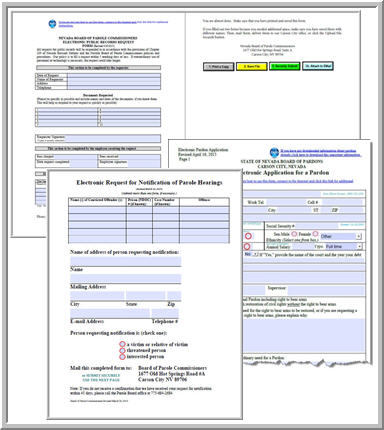
If you see a form that looks like one of the above forms, that means that the form has opened in your browser. Save the form to your computer, using one of the two methods shown in the slides, below. Also, you may view the video below for more detailed instructions. (This part is explained at 2:36--two minutes and 36 seconds into the video, if you want to skip ahead.)
Video: How to Download a Form
This video explains how to download a form (which is a .pdf file) , and how to save the form in a location where you will be able to easily find it and fill it in. The video will open in a separate tab or page so that you may view it and still have this web page open for reference.
Downloadable Hearing & Application Related Forms
Here are links to files that you may download. If you have any problems or issues, please send an e-mail to ajordan at parole.nv.gov.
Technical considerations for downloading files
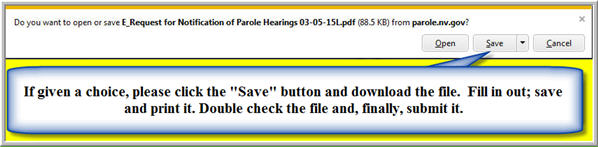
These are .pdf forms, which must be completed off line. Do not try to fill them out and submit them on line. You must download the file. Depending upon the computer you are using, and the way your browser has been set up, the file may download, or it may open in your browser. If a browser does open in your browser, save it to your computer and then fill it out, save it, print it and submit it. If you are not sure how to do this, we strongly suggest that you view the video that explains how to download a file and save it in a place where you can easily find it. It will open in a separate window so that you do not have to close this page.
Technical Considerations When You are About to Upload a Completed Form (.pdf file)
Our .pdf files have four buttons that you can use to save the file, print it and submit it. These buttons, shown below, appear at the end of each of these forms.

After you press the green button (3. Securely Submit) on the form, you will be taken to a web page where you can upload the file. When you arrive at this page, you will need to attach the file to the secure submission form so that it will be submitted.
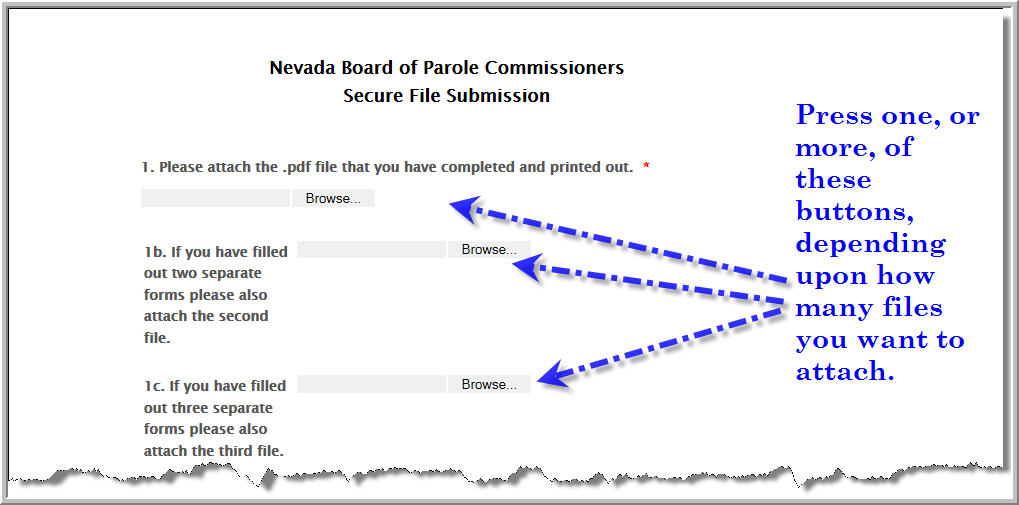
After you press the "Browse" button, you can go to the place where you have stored the file and attach it to your submission. The name of the file will show up here.

I need another form, but can't find it
As a courtesy, the Parole Board places forms that are developed by other agencies on our website. We have made electronic versions of all of the forms that are our responsibility. If you are looking for an electronic version of a form that does not appear here, please visit the website of the Division of Parole and Probation (P&P).
Why you may need to contact P&P
The Parole Board is a body that makes parole decisions. P&P is an enforcement division that employs sworn officers. As a courtesy to those who visit our site, we provide forms such as the Appeal of Lifetime Supervision Conditions and its instructions; Parolee Statement Of Financial Hardship; and the Lifetime Supervision Release Petition Packet-2014. P&P has not yet provided us with the electronic versions of the forms that are part of their workflow.
 NV.gov